> For the complete documentation index, see [llms.txt](https://coinsdo.gitbook.io/docs/llms.txt). Markdown versions of documentation pages are available by appending `.md` to page URLs; this page is available as [Markdown](https://coinsdo.gitbook.io/docs/coinsend/how-to/make-a-transfer.md).
# Make a transfer
1. In the main account's homepage, you can obtain the sub-account platform URL and forward it to the sub-account holders for them to login.
2. Upon logging in sub-account platform, navigate to "Dispatch Record" > "Add dispatch record"
3. Select the currency required, input the deposit address into the "To" box and fill in withdrawal amount into "Dispatch amount" box. If you would like to leave a note on chain, simply fill in the "On-chain remark" box. If you would like to leave a note for this transaction in this platform only, simple fill in the "Order remark" box. Once everything is done, click the "Submit" button to proceed.
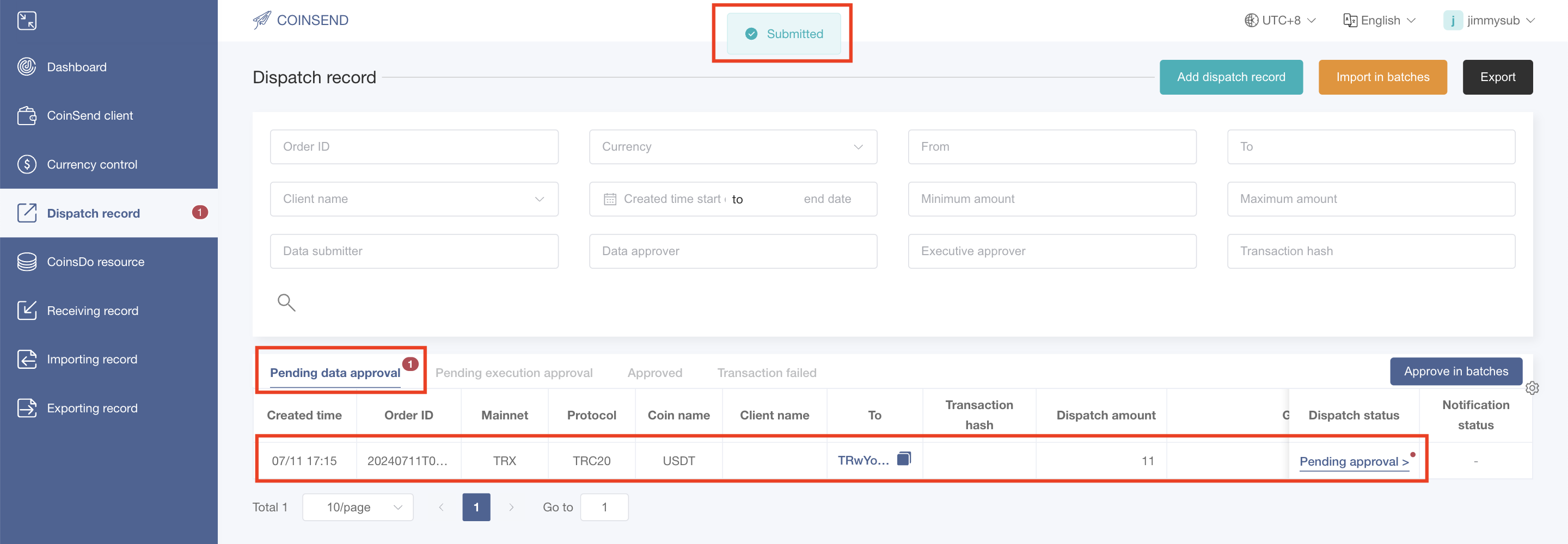
4. Upon submitting the dispatch record, you would see the "Submitted" message appearing at the top of the screen, and a new dispatch record pending for approval appears in the "Pending data approve" list.